> ## Documentation Index
> Fetch the complete documentation index at: https://docs.primeintellect.ai/llms.txt
> Use this file to discover all available pages before exploring further.
# Inference Overview
> Access powerful language models through Prime Intellect Inference API
Prime Intellect Inference provides OpenAI-compatible API access to state-of-the-art language models. Our inference service routes requests to various model providers, offering flexible model selection made for running large scale evaluations.
## Getting Started
### 1. Get Your API Key
First, obtain your API key from the [Prime Intellect Platform](https://app.primeintellect.ai):
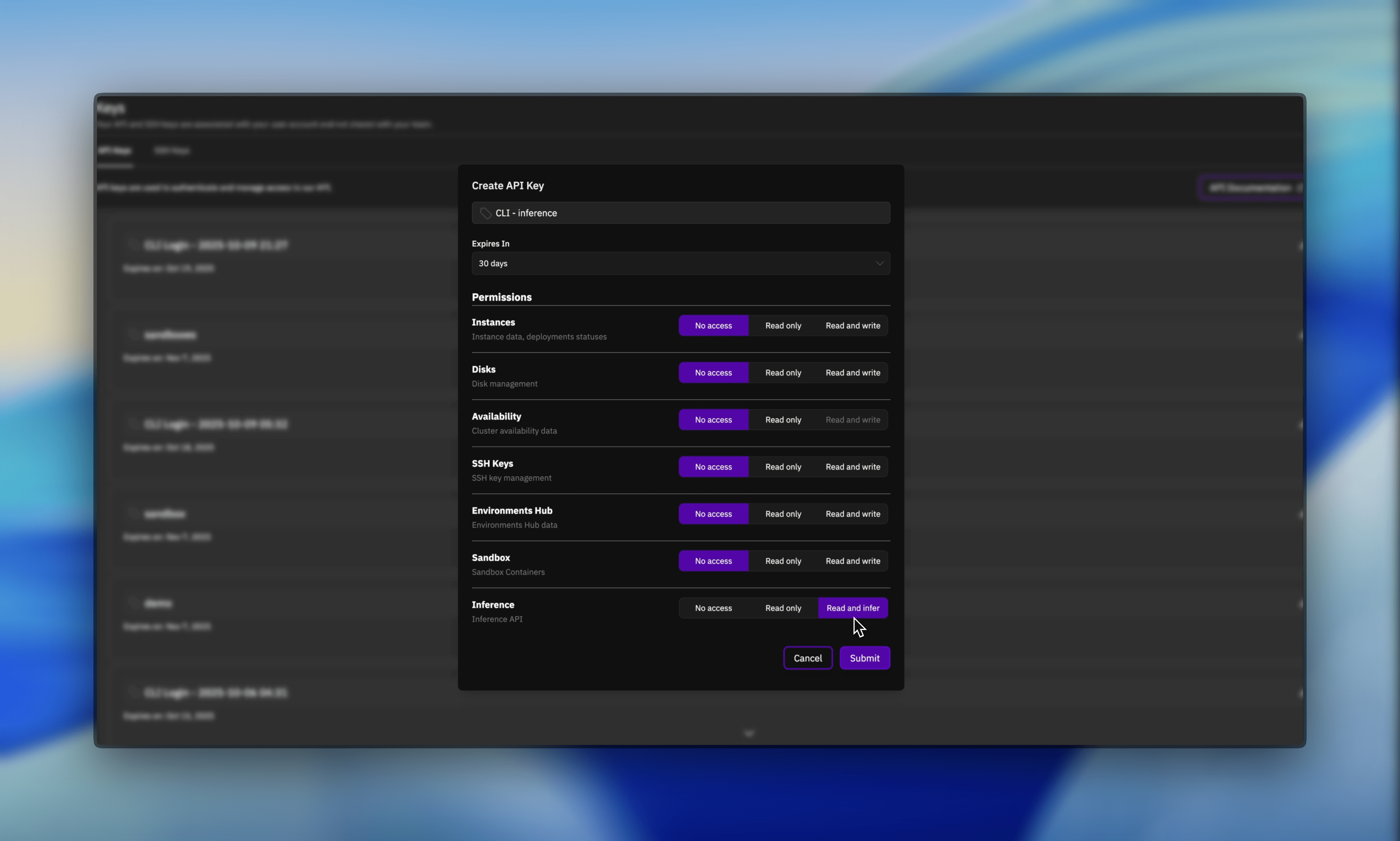
1. Navigate to your account settings
2. Go to the API Keys section
3. Generate a new API key with **Inference** permission enabled
Make sure to select the **Inference** permission when creating your API key. Without this permission, your requests will fail with authentication errors.
 ### 2. Set Up Authentication
Set your API key as an environment variable:
```bash theme={null}
export PRIME_API_KEY="your-api-key-here"
```
### 3. Access through the CLI or API
You can use Prime Inference in two ways:
#### Prime CLI (Recommended for Evaluations)
The Prime CLI provides easy access to inference models, especially useful for running evaluations:
```bash theme={null}
# List available models
prime inference models
# Use with environment evaluations (most common use case)
prime env eval gsm8k -m meta-llama/llama-3.1-70b-instruct -n 25
```
**For evaluations**: See [Environment Evaluations guide](/tutorials-environments/evaluating) for comprehensive examples and best practices regarding evaluations.
#### Direct API Access (OpenAI-Compatible)
**Team accounts**: Include the `X-Prime-Team-ID` header to use team credits instead of personal account. Find your team ID via `prime teams list` or on your [Team Profile page](https://app.primeintellect.ai/dashboard/team-profile).
```python Python theme={null}
import openai
import os
# Personal account
client = openai.OpenAI(
api_key=os.environ.get("PRIME_API_KEY"),
base_url="https://api.pinference.ai/api/v1"
)
# Team account (add X-Prime-Team-ID header)
client = openai.OpenAI(
api_key=os.environ.get("PRIME_API_KEY"),
base_url="https://api.pinference.ai/api/v1",
default_headers={
"X-Prime-Team-ID": "your-team-id-here"
}
)
# Make a chat completion request
response = client.chat.completions.create(
model="meta-llama/llama-3.1-70b-instruct",
messages=[
{"role": "user", "content": "What is Prime Intellect?"}
]
)
print(response.choices[0].message.content)
```
```bash cURL theme={null}
curl -X POST https://api.pinference.ai/api/v1/chat/completions \
-H "Authorization: Bearer $PRIME_API_KEY" \
-H "Content-Type: application/json" \
-d '{
"model": "meta-llama/llama-3.1-70b-instruct",
"messages": [
{"role": "user", "content": "What is Prime Intellect?"}
]
}'
# With team account (add X-Prime-Team-ID header)
curl -X POST https://api.pinference.ai/api/v1/chat/completions \
-H "Authorization: Bearer $PRIME_API_KEY" \
-H "X-Prime-Team-ID: your-team-id-here" \
-H "Content-Type: application/json" \
-d '{
"model": "meta-llama/llama-3.1-70b-instruct",
"messages": [
{"role": "user", "content": "What is Prime Intellect?"}
]
}'
```
```javascript JavaScript theme={null}
const response = await fetch('https://api.pinference.ai/api/v1/chat/completions', {
method: 'POST',
headers: {
'Authorization': `Bearer ${process.env.PRIME_API_KEY}`,
'Content-Type': 'application/json',
// Add 'X-Prime-Team-ID': 'your-team-id-here' for team accounts
},
body: JSON.stringify({
model: 'meta-llama/llama-3.1-70b-instruct',
messages: [
{ role: 'user', content: 'What is Prime Intellect?' }
]
})
});
const data = await response.json();
console.log(data.choices[0].message.content);
```
## Available Models
Prime Inference provides access to various state-of-the-art language models. You can list all available models using the models endpoint:
### Get All Available Models
```python Prime CLI theme={null}
# List all available models
prime inference models
```
```python OpenAI Client theme={null}
# List all available models
models = client.models.list()
for model in models.data:
print(f"Model: {model.id}")
```
```bash cURL theme={null}
curl -H "Authorization: Bearer your-api-key-here" \
https://api.pinference.ai/api/v1/models
```
## Pricing and Billing
Prime Inference uses token-based pricing with competitive rates:
* **Input tokens**: Charged for tokens in your prompt
* **Output tokens**: Charged for tokens in the model's response
* **Billing**: Automatic deduction from your Prime Intellect account balance
Pricing varies by model. We will provide more details on pricing soon and make it available through the models API.
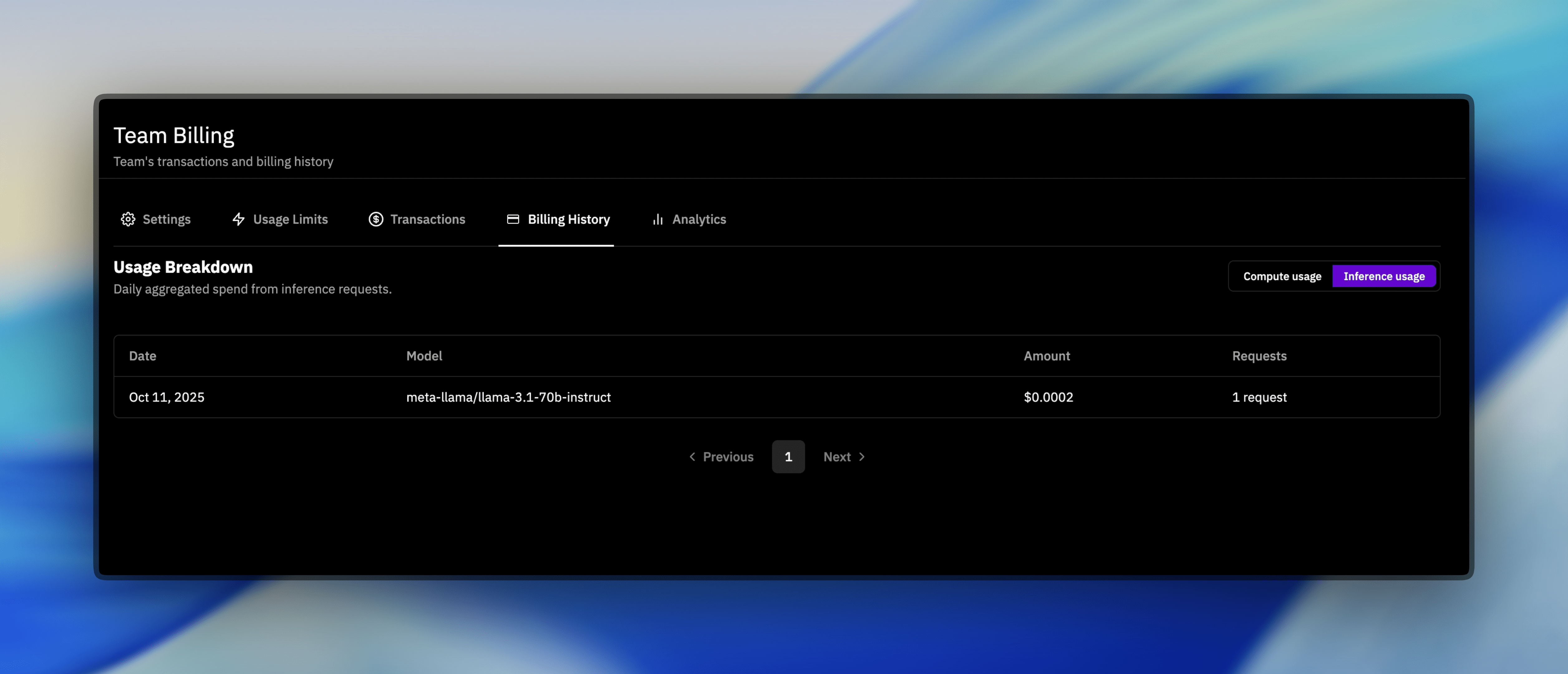
### Viewing Your Inference Usage
Track your inference usage and billing on the [Billing Dashboard](https://app.primeintellect.ai/dashboard/billing) under the **Inference** tab:
### 2. Set Up Authentication
Set your API key as an environment variable:
```bash theme={null}
export PRIME_API_KEY="your-api-key-here"
```
### 3. Access through the CLI or API
You can use Prime Inference in two ways:
#### Prime CLI (Recommended for Evaluations)
The Prime CLI provides easy access to inference models, especially useful for running evaluations:
```bash theme={null}
# List available models
prime inference models
# Use with environment evaluations (most common use case)
prime env eval gsm8k -m meta-llama/llama-3.1-70b-instruct -n 25
```
**For evaluations**: See [Environment Evaluations guide](/tutorials-environments/evaluating) for comprehensive examples and best practices regarding evaluations.
#### Direct API Access (OpenAI-Compatible)
**Team accounts**: Include the `X-Prime-Team-ID` header to use team credits instead of personal account. Find your team ID via `prime teams list` or on your [Team Profile page](https://app.primeintellect.ai/dashboard/team-profile).
```python Python theme={null}
import openai
import os
# Personal account
client = openai.OpenAI(
api_key=os.environ.get("PRIME_API_KEY"),
base_url="https://api.pinference.ai/api/v1"
)
# Team account (add X-Prime-Team-ID header)
client = openai.OpenAI(
api_key=os.environ.get("PRIME_API_KEY"),
base_url="https://api.pinference.ai/api/v1",
default_headers={
"X-Prime-Team-ID": "your-team-id-here"
}
)
# Make a chat completion request
response = client.chat.completions.create(
model="meta-llama/llama-3.1-70b-instruct",
messages=[
{"role": "user", "content": "What is Prime Intellect?"}
]
)
print(response.choices[0].message.content)
```
```bash cURL theme={null}
curl -X POST https://api.pinference.ai/api/v1/chat/completions \
-H "Authorization: Bearer $PRIME_API_KEY" \
-H "Content-Type: application/json" \
-d '{
"model": "meta-llama/llama-3.1-70b-instruct",
"messages": [
{"role": "user", "content": "What is Prime Intellect?"}
]
}'
# With team account (add X-Prime-Team-ID header)
curl -X POST https://api.pinference.ai/api/v1/chat/completions \
-H "Authorization: Bearer $PRIME_API_KEY" \
-H "X-Prime-Team-ID: your-team-id-here" \
-H "Content-Type: application/json" \
-d '{
"model": "meta-llama/llama-3.1-70b-instruct",
"messages": [
{"role": "user", "content": "What is Prime Intellect?"}
]
}'
```
```javascript JavaScript theme={null}
const response = await fetch('https://api.pinference.ai/api/v1/chat/completions', {
method: 'POST',
headers: {
'Authorization': `Bearer ${process.env.PRIME_API_KEY}`,
'Content-Type': 'application/json',
// Add 'X-Prime-Team-ID': 'your-team-id-here' for team accounts
},
body: JSON.stringify({
model: 'meta-llama/llama-3.1-70b-instruct',
messages: [
{ role: 'user', content: 'What is Prime Intellect?' }
]
})
});
const data = await response.json();
console.log(data.choices[0].message.content);
```
## Available Models
Prime Inference provides access to various state-of-the-art language models. You can list all available models using the models endpoint:
### Get All Available Models
```python Prime CLI theme={null}
# List all available models
prime inference models
```
```python OpenAI Client theme={null}
# List all available models
models = client.models.list()
for model in models.data:
print(f"Model: {model.id}")
```
```bash cURL theme={null}
curl -H "Authorization: Bearer your-api-key-here" \
https://api.pinference.ai/api/v1/models
```
## Pricing and Billing
Prime Inference uses token-based pricing with competitive rates:
* **Input tokens**: Charged for tokens in your prompt
* **Output tokens**: Charged for tokens in the model's response
* **Billing**: Automatic deduction from your Prime Intellect account balance
Pricing varies by model. We will provide more details on pricing soon and make it available through the models API.
### Viewing Your Inference Usage
Track your inference usage and billing on the [Billing Dashboard](https://app.primeintellect.ai/dashboard/billing) under the **Inference** tab:
 ## Next Steps
Streaming responses, advanced parameters, and more examples
Using inference with team accounts and managing team billing
Fix common inference errors, including insufficient funds and team billing context
**Primary use case**: Learn how to run model evaluations using `prime env eval` with inference models
Detailed documentation for models and chat completion endpoints
## Next Steps
Streaming responses, advanced parameters, and more examples
Using inference with team accounts and managing team billing
Fix common inference errors, including insufficient funds and team billing context
**Primary use case**: Learn how to run model evaluations using `prime env eval` with inference models
Detailed documentation for models and chat completion endpoints