

Environments Overview
Prerequisites
- Google Cloud account with BigQuery access. Free tier is sufficient; with that, you get 1 TB/month of queries. Downloading ~1,500 patents with full text uses ~3 GB.
- Prime Intellect account with Lab access. You’ll push environments to the Environments Hub and launch training runs from the CLI.
- OpenAI API key, which is used for generating Level 3 Q&A ground truth and the LLM judge at training time.
- Python 3.10+ with
verifiers,chromadb,openai, and theprimeCLI. Install the Prime CLI withuv tool install prime.
Step 1 - Get Patent Data
Use Google’spatents-public-data BigQuery dataset. It has full patent text (abstract, claims, description) and supports SQL filtering by company.
BigQuery query
Format each patent
Structure each patent as a markdown document and store metadata separately. Preserving document structure matters for Level 3 because the agent needs to navigate named sections.Step 2 - Design Three RL Environments
The three levels impose a curriculum. For example, an agent that can’t reliably callget_metadata() and parse a date string shouldn’t attempt multi-patent technical comparisons. Each level introduces qualitatively harder capabilities.
Level 1 - Single-tool metadata retrieval
Questions that require exactly one tool call with no computation or reasoning
Dataset size: 6,000 Q&A pairs. Every answer is deterministically verifiable from the metadata.
Reward: Binary - 1.0 for exact string match, 0.0 otherwise.
Tools available:
search_patents(query), get_metadata(patent_id)
Level 1 is a pipeline validation step. If reward doesn’t climb toward 1.0 within 15 steps, something is wrong with your tool definitions, reward function, or data formatting. It isn’t a model problem.
Level 2 - Multi-step computation and comparison
Questions requiring 2 or more tool calls followed by arithmetic or string comparison.
Dataset size: 500 Q&A pairs.
Reward: Binary on deterministic answers. For search questions with multiple valid answers, the reward function checks against a precomputed set of valid answers.
New tool:
get_abstract(patent_id) returns abstract text.
The environment does not do the math. The agent receives raw dates and counts from tool calls and must compute the answer itself. This is intentional to train the reasoning.
Level 3 - Open-ended technical analysis
Questions that require reading patent content, understanding technical concepts, and synthesizing answers that can’t be verified by pure string matching.
Dataset size: 500 Q&A pairs (LLM-generated with ground truth).
Reward: LLM judge, normalized.
New tools:
view_sections(patent_id), read_section(patent_id, section_name)
Step 3 - Generate Verifiable Q&A Pairs
Levels 1 and 2
Iterate over the patent dataset, select random patents (or pairs for comparison questions), compute the answer directly from structured data, and generate the pair. Every answer is verified against the source data. For search-type questions, precompute all valid answers across the entire dataset. For example, if and question asks to identify “SSB” patents and three patents mention “SSB” in their title or abstract, all three filing dates are valid answers. Store this set, and the reward function will check against it at training time.Level 3 - LLM-generated ground truth
Each Level 3 entry needs a structured reference that the judge can use at training time. Use the LLM to generate three components per question:- answer - the reference answer in writing
- key_points - specific factual claims the answer must contain
- source_quotes - direct quotes from the patent text supporting each key point
Validate your dataset
Run these checks on every generated pair before training:- Every patent ID referenced in a question exists in the dataset
- Every Level 3 ground truth has at least one key point
- Source quotes from Level 3 ground truth actually appear in the patent text (substring match)
Step 4 - Reward Design
Levels 1 and 2
Level 1 and 2 reward designs were straightforward.Level 3 - LLM judge
Getting the judge right required three iterations. Here’s what failed and what ended up working. Iteration 1 - didn’t work: Multi-dimensional weighted scoring (accuracy, completeness, reasoning, conciseness, 0-10 each). Failed because regex parsing of scores was fragile, and per-category weight tuning is a second optimization problem on top of the first. Iteration 2 - didn’t work: Per-question custom rubrics (5 criteria x 2 points each, LLM-generated per question). More principled, but LLM-generated rubrics introduced contradictions like asking for content that would actually weaken an otherwise correct answer. Iteration 3 - works: Universal rubric with content-specific ground truth. The ground truth (answer, key_points, source_quotes) already provides all content specificity needed.
The judge receives the question, the agent’s response, the reference answer, key points, and source quotes. It returns structured JSON, normalized to [0, 1]:
Step 5 - Build the Tool Environment
The environment is implemented using the verifiers library as aToolEnv. The agent receives a system prompt describing its role as a patent analyst with access to a dataset of N patents, a question, and a set of tools.
Tool definitions
get_metadata() on the same patent multiple times with no side effects.
Schema to tools generalization
Patents have standardized sections (Abstract, Claims, Description) and coded metadata. This makes them well-suited for tool-based environments. The same structure applies to any document domain with a known schema such as legal filings map toget_case_metadata(), SEC filings to read_section("Risk Factors"), and so on.
Step 6 - Parsing Strategy
Avoid regex in the pipeline because when not implemented well, it can introduce reward hacking. Use simple string methods and structured JSON instead:Step 7 - Train on Lab
Prime Intellect’s Lab platform handles GPU orchestration and multi-tenant LoRA deployments. You push your environment to the Environments Hub, define a training config, and launch the run from the CLI.Step 7.1 - Push environment to the Hub
Step 7.2 - Define a training config
Step 7.3 - Calibrate model to environment difficulty
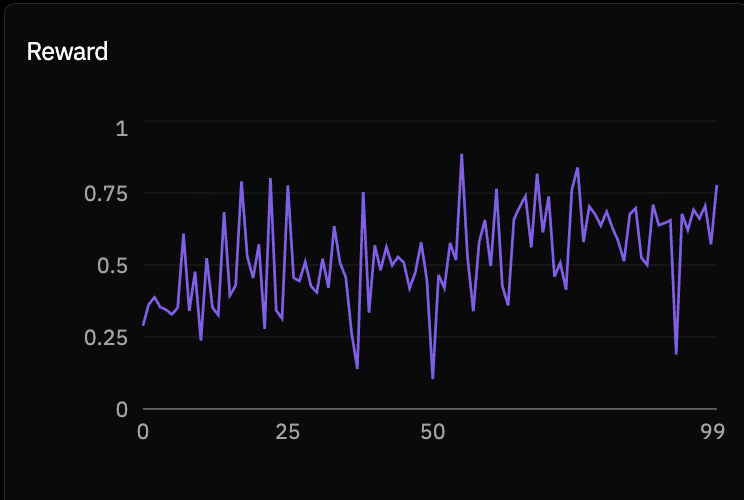
Before committing to a full training run, verify the base model finds the task challenging but not impossible. A model that starts too high has nothing to learn; one that starts too low can’t generate useful gradient signal. Target starting reward is around 0.15 to 0.35. Do a short 10-step run first and read the reward curve. It plots mean reward per step across all rollouts in the batch. If starting reward is outside that range, adjust difficulty or model size before launching the full run.Step 7.4 - Launch the full run
--env-var, or set them in the environment settings — both work.
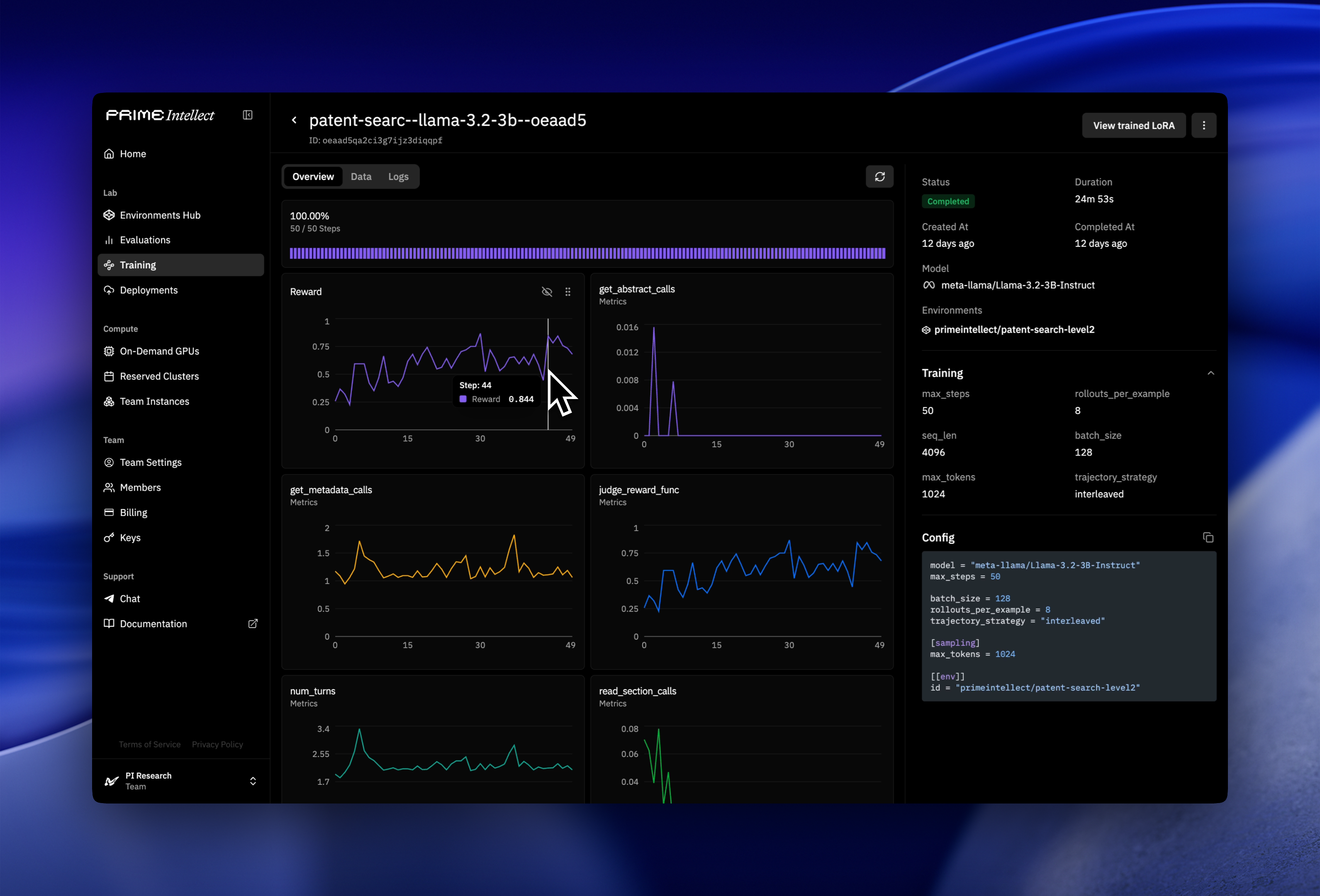
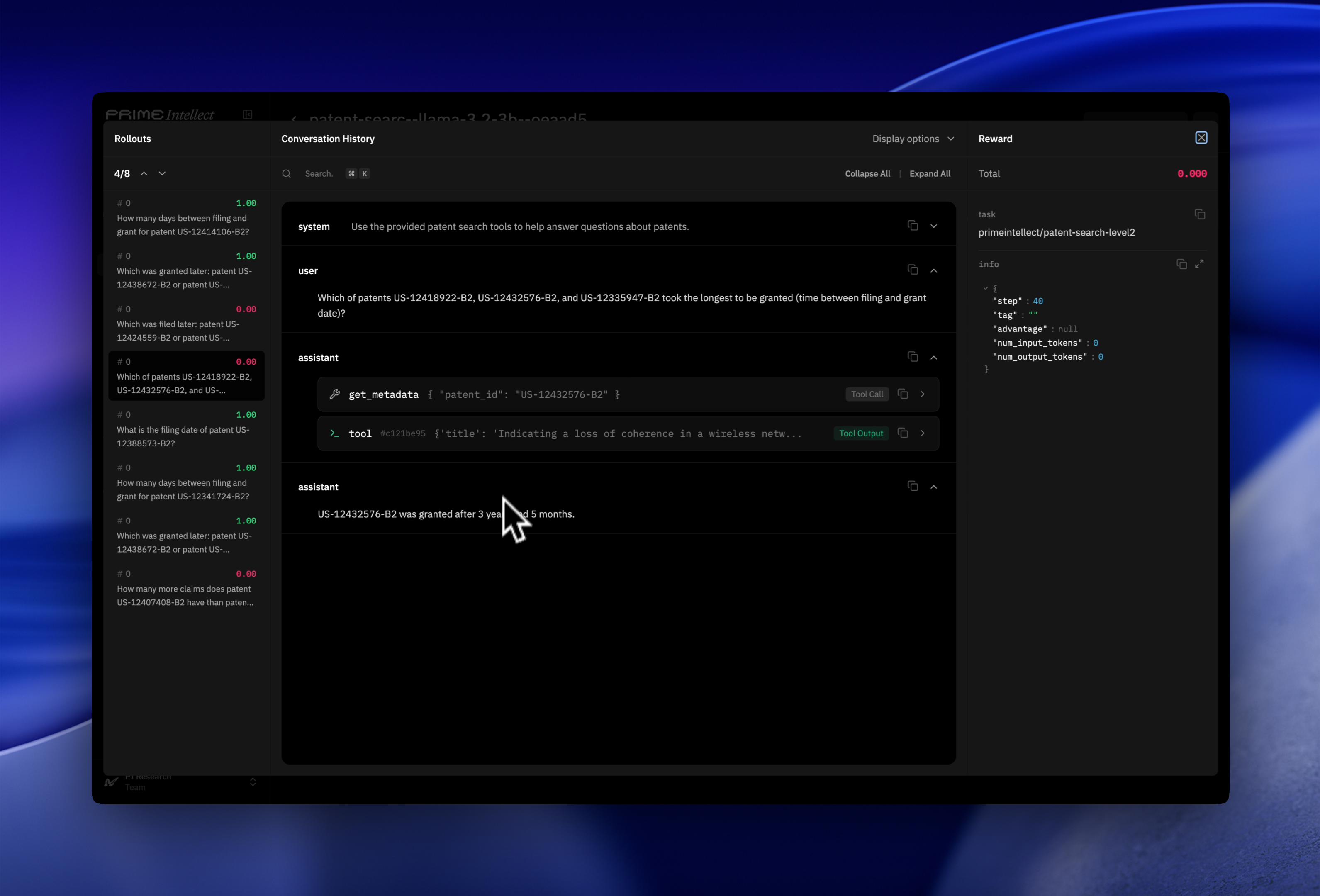
Once the run is live, the Lab dashboard shows per-step metrics including mean reward, reward standard deviation, response length, and tool call count. Tool call count is worth checking early. If the agent isn’t calling tools in the first few steps, the system prompt isn’t clear enough about what tools are available and when to use them. Below are some screenshots of what the Prime Intellect dashboard looks like.
Config parameters to tune
Results
Trained Qwen3-4B-Instruct and Llama-3.2-3B-Instruct across all three levels. The rollout viewer in Lab lets you inspect individual trajectories turn by turn: each tool call, its response, and the final answer. It’s the most direct way to see what the model is actually learning to do at each level and understand in depth why the reward curve is behaving as it is.Level 1
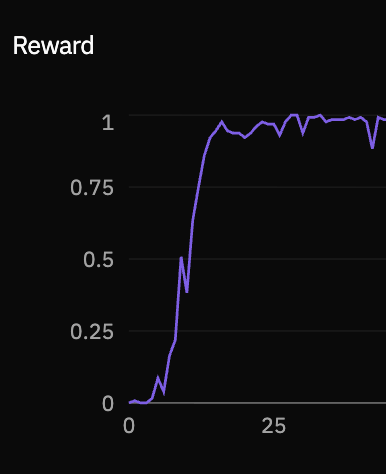
get_metadata() and reading the response, it gets nearly everything right.
Level 2
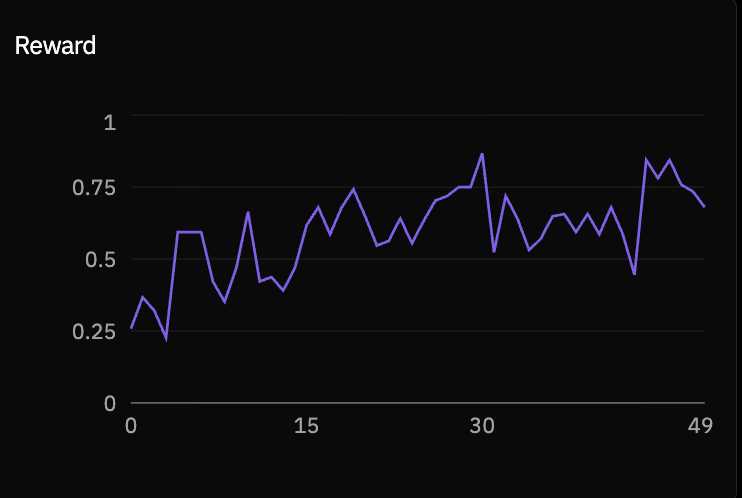
Level 3
Extending This to Other Domains
The core architecture (schema-derived tools, progressive difficulty levels, universal rubric with content-specific ground truth) is not patent-specific. To adapt it to the following categories, you can:- Legal case search: Replace
read_section("Claims")withread_section("Holding"). The judgment or ruling is your Level 3 answer target. - SEC filings: 10-K documents have standardized sections (Risk Factors, MD&A, Financial Statements).
- Medical literature: PubMed abstracts for Level 1, full-text PMC articles for Level 3. Use MeSH terms for structured metadata.
- Enterprise knowledge bases: Internal docs with known schemas. Level 3 judge needs domain-appropriate ground truth generation.
All environments are published on the Environments Hub. The patent dataset is on HuggingFace.