

Multimodal Browser Environments in verifiers
BrowserEnv now supports vision-based web browsing via Computer Use Agent (CUA) mode. Both modes are modes in verifiers and we provide examples for trying both. This guide covers the two interaction modes, how to get started, and walks through two real environments: a lightweight eval (bb_demo.py) and a full benchmark for training (webvoyager_no_anti_bot.py). It also covers BrowserEnv-specific pieces of RL training, including DOM and CUA training configurations and how to integrate with Lab.
Two Modes of Browser Interaction
BrowserEnv is a unified StatefulToolEnv subclass that supports two operating modes, selected via the mode parameter. Both modes use Browserbase as the browser provider.
DOM Mode: Natural Language Control
DOM mode uses the Stagehand SDK to translate natural language instructions into browser actions. Stagehand runs its own LLM internally (configured viastagehand_model, defaults to openai/gpt-4o-mini) to interpret the page DOM and execute the appropriate operations.
The agent’s tool surface is high-level and semantic:
navigate(url): go to a URLobserve(instruction): find possible actions matching a natural language descriptionact(instruction): execute an action described in natural language (click a button, fill a form)extract(instruction, schema_json): extract structured data from the page
proxy_model_to_stagehand=False (default), Stagehand uses its own stagehand_model and MODEL_API_KEY. When proxy_model_to_stagehand=True, BrowserEnv injects the rollout client’s model name, base URL, and API key into observe, act, and extract, so those Stagehand calls run through the same client/model endpoint as the rollout model.
CUA Mode: Vision-Based Control (Multimodal)
CUA mode gives the agent a live screenshot of the rendered page after every action. The agent sees pixels and acts via screen coordinates, the same way a human would interact with a screen. The agent’s tool surface is low-level and coordinate-based:click(x, y, button): click at screen coordinatesdouble_click(x, y): double-click at coordinatestype_text(text): type text into the focused elementkeypress(keys): press keyboard keysscroll(x, y, scroll_x, scroll_y): scroll at a positiongoto(url): navigate to a URLback()/forward(): browser history navigationwait(time_ms): wait for a specified durationscreenshot(): capture the current page state
image_url content block. The model processes both. After the tool call returns, BrowserEnv moves screenshot parts out of tool messages into a trailing user message. When keep_recent_screenshots is set, older screenshots are replaced with [Screenshot removed to save context] placeholders.
When to use it: Tasks that require visual understanding, such as navigating unfamiliar UIs, interacting with canvas-rendered apps, clicking elements that lack semantic markup, or any workflow where a human would need to look at the screen to proceed.
Side-by-Side Comparison
Getting Started
Installation
Both example environments require thebrowser extra:
Environment Variables
Running the Examples
Both examples ship with the same task: navigate to the Prime Intellect homepage and read the headline. Note to do the below, you need to have a prime account.CUA Mode Execution Backends
CUA mode requires a CUA server — a lightweight TypeScript HTTP service that bridges the Python browser agent and the browser. Under the hood, Browserbase uses Understudy, a custom and powerful Chrome DevTools Protocol (CDP) driver developed at Browserbase as part of Stagehand, the AI browser automation framework. Understudy was built to overcome limitations in Playwright’s built-in automation capabilities (e.g. more granular input control and richer session introspection). Because Understudy’s CDP engine is written in TypeScript, a thin server layer is needed to expose it as a REST API that the Python environment can call. The CUA server is that layer — it receives coordinate-based action requests over HTTP, translates into CDP commands via Understudy, and returns screenshots back to the agent. Three execution modes are available, from fastest to most flexible:1. Pre-built Docker Image (Default)
Usesdeepdream19/cua-server:latest with everything pre-installed. Startup takes ~5–10 seconds. This is the recommended approach.
2. Binary Upload
Builds and uploads a custom CUA server binary to a sandbox at runtime. Startup takes ~30–60 seconds. Use this when you need a modified server.3. Manual Server (Local Development)
Connect to a locally running CUA server. Start the server yourself, then point the environment at it:Screenshot Management
CUA mode captures a screenshot after every action. Two parameters control how screenshots flow:save_screenshots(bool): persist every screenshot to disk as timestamped PNGs inscreenshot_dir(defaults to./screenshots). The CUA example defaults this toFalse; theBrowserEnvclass itself defaults toTrue.keep_recent_screenshots(int | None): how many recent screenshots to retain in the conversation context window sent to the model. Defaults to2. Set toNoneto keep all (higher token cost).
Example Environments
bb_demo: Quick Eval with Click Visualization
bb_demo.py is a lightweight single-task environment designed for quick CUA mode evaluation and debugging. It serves as a hello world for multimodal browser environments and pairs a simple browsing task with a custom CUAMode subclass that annotates saved screenshots with click markers.
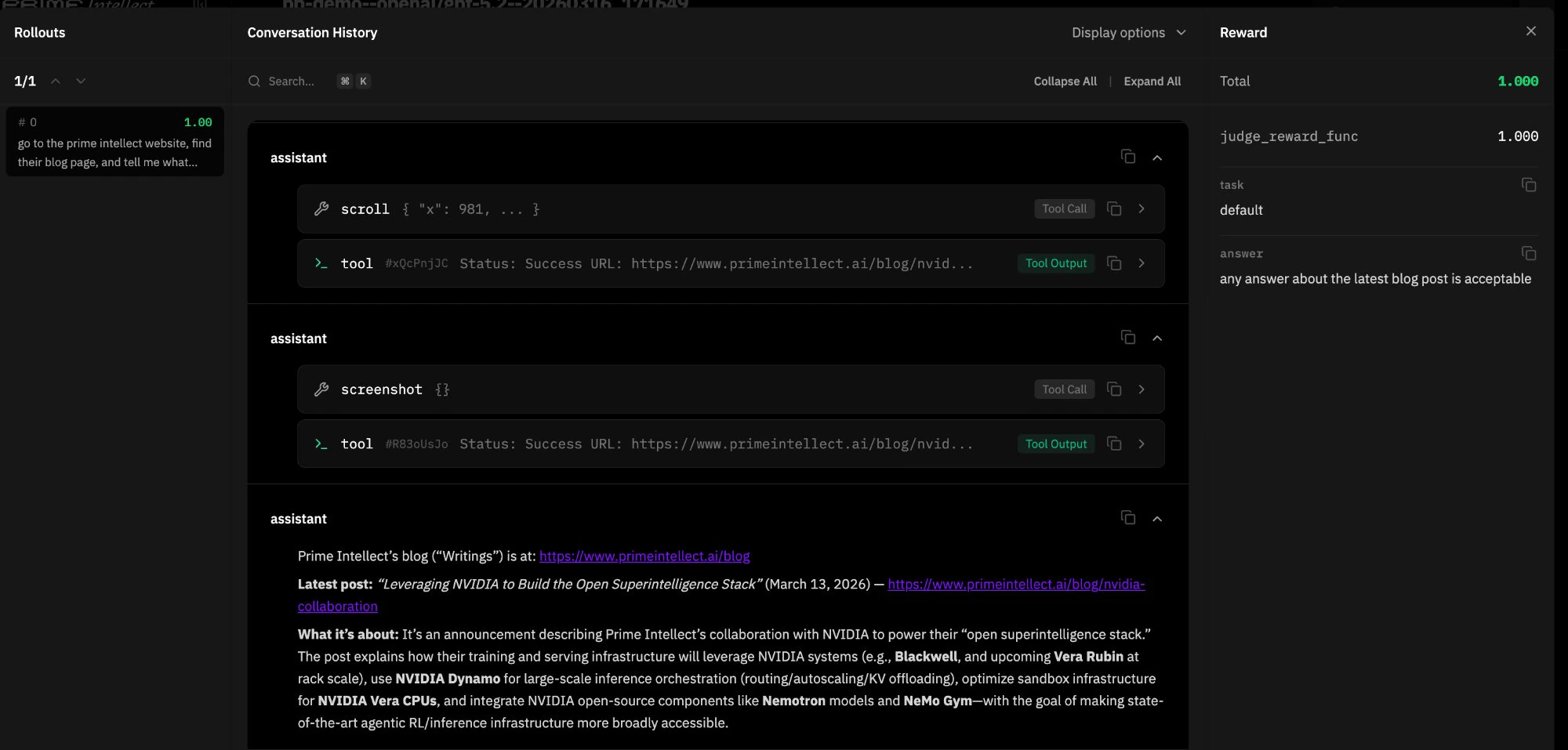
JudgeRubric backed by gpt-4.1-mini evaluates whether the agent’s response adequately describes the blog content, returning 1.0 for “yes” and 0.0 otherwise.
Click marker overlay. The environment subclasses CUAMode as ClickMarkerCUAMode, which overrides click() and double_click() to store the target (x, y) coordinates before each action. When the resulting screenshot is saved to disk, _save_screenshot_with_marker() uses Pillow to composite a visual marker (concentric circles, crosshairs, coordinate label) onto the PNG. The marker is drawn on the saved file only. The screenshot returned to the model in conversation context is unmodified, keeping the agent’s visual input clean while giving developers an annotated record of every click.
Subclassing pattern. ClickMarkerBrowserEnv intercepts BrowserEnv.__init__ when mode="cua". It manually extracts all CUA-specific parameters from kwargs, bypasses the parent’s mode setup by calling StatefulToolEnv.__init__ directly, then constructs and registers the custom ClickMarkerCUAMode. For DOM mode, it delegates entirely to the parent. This pattern is useful any time you need to swap in a custom mode implementation without forking BrowserEnv.
Usage:
uv pip install Pillow. Without it, screenshots still save without markers and the environment shows a warning at startup.
webvoyager_no_anti_bot: Training-Scale Benchmark
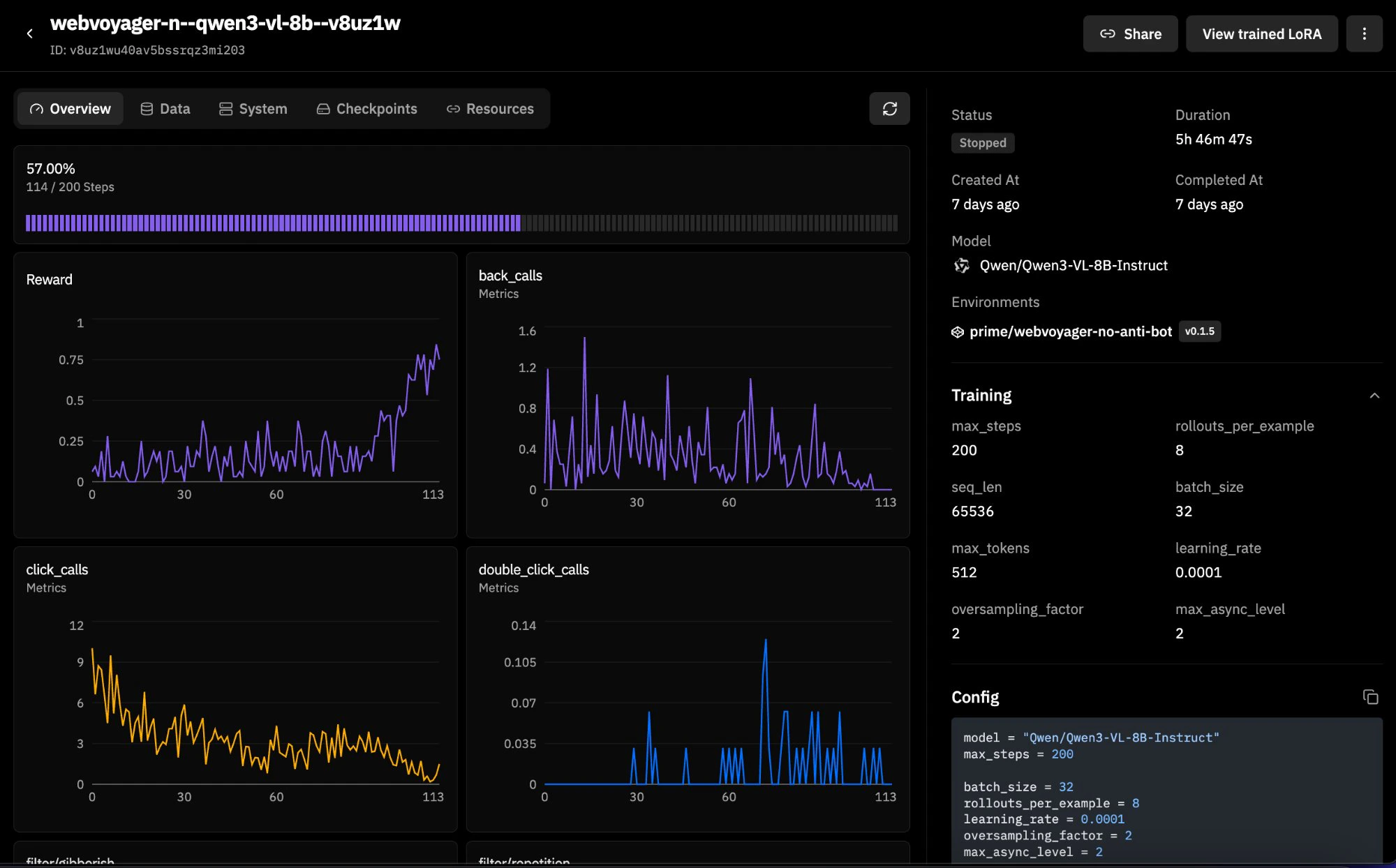
WebVoyager is a 600-task web navigation benchmark spanning real websites (Allrecipes, Amazon, Apple, ArXiv, GitHub, Google Flights/Maps/Search, ESPN, and more). This version filters out 43 tasks from dictionary.cambridge.org that are blocked by Cloudflare anti-bot protection, leaving 93.3% of the original dataset intact. It supports both DOM and CUA modes, making it a good candidate for RL training runs. Here is an example training run with Qwen3-VL-8B-Instruct:
WebVoyager_data_clean.jsonl). Each row has a natural language task (ques), a starting URL (web), a website name (web_name), and a task ID. There are no ground-truth answers because WebVoyager is task-completion-based rather than answer-matching. You can filter by website with web_filter (e.g., web_filter="Amazon") and limit the number of examples with num_examples.
Evaluation. Since there are no explicit answers, the environment uses a task-completion judge. The agent’s entire multi-turn trajectory is rendered into a structured text transcript by WebVoyagerTrajectoryParser, a custom vf.Parser subclass. This transcript includes assistant messages, tool calls with normalized arguments, and truncated tool results, while images are excluded. The transcript is capped at 12,000 characters to keep judge context manageable. The judge prompt instructs the LLM to verify that the agent navigated to the correct site, performed the required actions, and reached the requested end state. If the agent made no tool calls at all, the reward is automatically 0.0 without consulting the judge.
Transcript rendering. render_webvoyager_transcript() walks the completion messages and emits a line-by-line log: ASSISTANT: for text, TOOL_CALL name({args}) for tool invocations, and TOOL_RESULT: for tool responses (truncated to 500 characters each). This keeps the judge grounded in what actually happened rather than what the agent claims happened. The judge prompt explicitly says to treat unsupported assertions as insufficient evidence.
Mode flexibility. load_environment() accepts mode="dom" or mode="cua" and passes all relevant configuration through to BrowserEnv. Both modes work against the same dataset and rubric.
Usage:
num_examples or web_filter to scope it down.
Building Your Own Browser Environment
Both examples follow the standard verifiers environment contract: a Python module exposingload_environment(**kwargs) -> vf.Environment. The pattern is:
- Define a dataset: a HuggingFace
Datasetwithquestion,answer, and optionallystart_urlandtask_idcolumns. For task-completion benchmarks where there’s no ground-truth answer (like WebVoyager), setanswerto an empty string and rely on a task-completion judge. - Define a rubric: typically a
JudgeRubricwith an LLM judge. For answer-matching tasks, the judge compares agent output to the expected answer. For task-completion tasks, subclassvf.Parserto render the trajectory into a judge-friendly transcript and evaluate whether the task was actually done. - Construct a
BrowserEnv: passmode, dataset, rubric, system prompt, and any mode-specific configuration. - Package it: add a
pyproject.tomlwithverifiers[browser]>=0.1.8as a dependency.
RL Training with Browser Environments
Browserbase integrates with Prime Intellect throughBrowserEnv. Browserbase handles the cloud browsers, BrowserEnv wraps those sessions as a verifiers environment, and Prime runs the evaluation or RL training loop.
In practice, that means the same BrowserEnv configuration can be used in both evaluation and training. The training-specific questions are usually:
- whether you want
mode="dom"ormode="cua" - whether Stagehand should keep its own model or be routed through the rollout model
- which browser/session settings you want in the
[[env]]config
Before You Train
- Validate the environment with evals first. Reward quality matters more than running a large training job quickly.
- Check reward distribution. If everything is
0.0or everything is1.0, the run will not teach you much. - Start with a small training run before scaling up browser minutes and GPU time.
Training Target in This Repo
webvoyager_no_anti_bot is the training-scale BrowserEnv example in this repo.
- 600 tasks in the filtered WebVoyager dataset
- supports both
mode="dom"andmode="cua" - uses task-completion reward rather than answer matching
- renders assistant text, tool calls, and truncated tool results into the judge transcript
- returns
0.0reward immediately if a rollout makes no tool calls
DOM Training
A DOM sample run can be done with the following configuration:- model:
Qwen/Qwen3-4B-Instruct-2507 batch_size = 64rollouts_per_example = 8- environment id:
browserbase/webvoyager-no-anti-bot
stagehand_model and MODEL_API_KEY. If you want the trained rollout model to also handle Stagehand’s DOM operations, enable proxy_model_to_stagehand=true. In that configuration, observe, act, and extract are routed through the same client/model endpoint as the rollout model.
The checked-in sample does not add extra BrowserEnv args. Add them when you want shared Stagehand routing:
CUA Training
A vision-language sample run can be done with the following configuration:- model:
Qwen/Qwen3-VL-4B-Instruct batch_size = 32rollouts_per_example = 4- environment id:
prime/webvoyager-no-anti-bot - BrowserEnv args:
mode = "cua",max_turns = 10,viewport_width = 800,viewport_height = 600,keep_recent_screenshots = 2,memory_gb = 6
.toml file:
Credentials and Workflow Notes
- Always provide
BROWSERBASE_API_KEYandBROWSERBASE_PROJECT_IDwhen BrowserEnv is creating Browserbase sessions. - DOM mode needs
MODEL_API_KEYunless you route Stagehand through the rollout model withproxy_model_to_stagehand=true. - CUA mode uses the same BrowserEnv backend choices as evaluation. The current bundled CUA server template forwards
OPENAI_API_KEYinto Stagehand if it is present, but that is a server-template detail rather than a separate BrowserEnv training argument. - Browserbase credentials belong in environment variables or training secrets, not in the TOML file.
- The same BrowserEnv args used with
vf-eval -a '{...}'belong in the training config under[[env]]args = { ... }. - BrowserEnv does not expose sandbox authentication as a constructor argument.
prime-rl use the same BrowserEnv-side mode choice and environment args. The difference is in how the training job is orchestrated, not in how BrowserEnv behaves.
Picking DOM vs CUA for Training
Performance Notes
- Browser training rollouts are slower than text-only environments because each rollout step interacts with a real browser session.
- CUA mode is heavier than DOM mode because screenshots must be rendered, carried in context, and consumed by the model.
- If your task does not need visual grounding, DOM mode is usually the faster and cheaper place to start.